If your Truma Level Control will not connect, or shows 0 or wrong readings, it usually comes down to one of four things: no bottle type selected, poor contact with the bottle base, an unsuitable bottle or pairing that was never completed. Most cases take you a few minutes to sort out yourself.
Below we go through the causes one by one, using the information in the Truma manual and what we see most often in CampMatic support.
At a glance
- Bottle type: it is selected in the Truma app. If it is missing, the reading in CampMatic stays empty. This is the most common cause.
- Pairing: briefly press the button on the sensor, range about 10 m, check the batteries.
- Measurement: the bottle base and coupling pad must be clean, and the bottle must be suitable (steel or aluminium, 5 to 33 kg).
- Factory reset: hold the button for 20 seconds, then connect again.
- iNet X: since October 2024 the Level Control can be added to the iNet X system, up to two sensors.
First check: is a bottle type selected?
The Level Control uses ultrasound to measure the height of the liquid gas in the bottle. It calculates percent and kilograms from that, using the bottle type you set in the Truma app. Without a bottle type, there is nothing to base the calculation on.
In CampMatic, this is the most common cause of an empty reading. CampMatic only reads the bottle type; you cannot change it there. If none is selected in the Truma app, the reading in CampMatic stays empty.
The bottle type is also worth checking if the readings are wrong. If you change to a different bottle size or type, Truma says you must update it in the Truma app.
No Bluetooth connection: the causes
This is how pairing works according to the Truma manual: start the device search in the app, then briefly press the button on the Level Control. The status LED flashes for up to two minutes and goes out once the connection is made.
If that fails, Truma lists these causes:
- Too far away: Bluetooth reaches about 10 m, less depending on where the sensor is fitted.
- Sensor shielded: as a test, place the sensor right next to the device it should connect to.
- Battery flat or inserted the wrong way round: the Level Control takes 2 × AAA alkaline (LR03). The manual does not allow rechargeable batteries. Use leak-proof batteries of the same type and make.
- Not set up in the app or button not pressed.
In the cold: the sensor is designed for −20 to +50 °C.
Pairing in CampMatic
In CampMatic, pairing runs in two stages. Under Settings → Devices → Add device, pick Truma Level Control. The sensor appears in the search on its own. Only then do you press the button on the sensor once. Reading out its credentials takes about a minute.
- Box firmware: the CampMatic box needs firmware 1.22 or newer. This refers to the box's firmware, not the sensor's. With older box firmware, the device type does not even appear.
- Limits: up to 8 paired sensors per box, of which no more than 4 BM2.
- With an iNet X Panel: with CampMatic for Truma iNet X you pair the Level Control with the panel, not with the box.
Level Control shows 0 or wrong readings
If the level is not updated or no measurement is taken, Truma's troubleshooting table lists these causes:
- The bottle really is empty.
- Poor acoustic coupling between the sensor and the bottle base.
- Bottle or coupling pad dirty, for example with rust or ice.
- Coupling pad damaged or missing.
- Bottle unsuitable or in poor condition.
- Sensor not fitted correctly.
Bottle base and coupling pad
The ultrasound has to pass through the bottle base. According to Truma, dirt and rust get in the way, including an invisible rust patch on the inside, very thick paint, frozen condensation and dented or heavily scratched bases. The fix: clean the base or measure at a different spot.
If the base is dented, the coupling pad hangs in the air. Moving the sensor away from the centre helps. A damaged coupling pad is available from Truma as a spare part.
Is the bottle suitable?
- Suitable: upright steel or aluminium bottles for propane or butane, 200 to 350 mm in diameter, 5 to 33 kg.
- Not suitable: composite gas bottles, refillable tank bottles, fixed gas tanks and butane cartridges. In refillable bottles, the internal parts deflect the ultrasound.
- Aluminium bottles: the magnet does not hold, so you need Truma's clamping plate.
- Bottle standing on the sensor: the bottle's foot ring is not deep enough. Truma's fix: stand feet. If the foot ring is too narrow, the coupling pad gets squashed.
After changing the bottle
Every time you change the bottle, briefly press the button on the Level Control. Clean snow, ice, rust and dirt off the bottle base and the coupling pad first. Lift the sensor off vertically instead of dragging it across the base.
Resetting the Truma Level Control to factory settings
Hold the button on the Level Control for 20 seconds until the status LED lights up briefly. The sensor then has to be connected again. Truma's service team also recommends this reset if the level stops updating.
Do not confuse it with resetting the iNet Box (holding its Bluetooth button for 20 seconds): that deletes all of the box's Bluetooth pairings, including the one with the Level Control.
Connecting the Level Control to iNet X
Since an app update in October 2024, the Level Control can be added to the iNet X system. According to Truma, you first set it up in the app and specify the bottle type. You then see the level via the relevant tile in the app. Up to two Level Controls can be set up at the same time.
With CampMatic for Truma iNet X you also pair the Level Control with the panel. Its levels then appear automatically on the CampMatic dashboard.
The level from anywhere
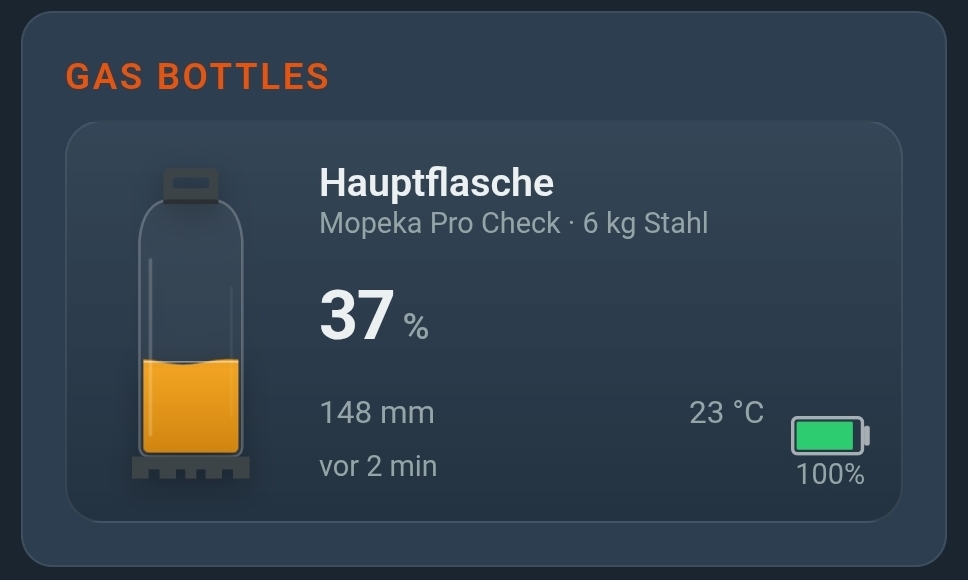
Bluetooth ends after about ten metres. CampMatic reads the Level Control inside the vehicle and passes the readings on over Wi-Fi or 4G: to the app, to the Telegram bot and, if you like, to Home Assistant. You set a threshold per bottle and get a message before the gas runs out.
This works with the boxes for Truma and with CampMatic Guard, which works in any camper, whatever heater is fitted.
Frequently asked questions
Why will my Truma Level Control not connect?
Usually the button on the sensor was not pressed, the distance is too great, the sensor is shielded or the battery is flat. In CampMatic, also check: box firmware 1.22 or newer, and only press the button once the sensor appears in the search.
Why does my Level Control show 0?
Check the bottle type in the Truma app first. Then the bottle base and coupling pad: rust, ice, thick paint or a dented base interfere with the measurement. Refillable tank bottles and composite bottles cannot be measured.
How do I reset the Truma Level Control to factory settings?
Hold the button for 20 seconds until the status LED lights up briefly. Then connect the sensor again.
Can I connect the Level Control to iNet X?
Yes, since the app update of October 2024. Up to two sensors can be used at the same time. The bottle type has to be specified.
Is there a firmware update for the Level Control?
Truma does not describe a firmware update for the sensor. The firmware 1.22 mentioned for CampMatic refers to the CampMatic box.
→ CampMatic for Truma · WiFi with gas monitoring — from €149
Further reading: