A Mopeka under the gas bottle measures the level by ultrasound, with no intervention in the gas system. The catch: it transmits over Bluetooth, and Bluetooth only reaches a few metres. Next to the vehicle you can read it. At home, in the office or while the camper is in winter storage, you cannot.
Here is how to read your Mopeka by app from anywhere, what you need and what it costs.
The key points
- The CampMatic box stays in the vehicle. It reads the Mopeka over Bluetooth and sends the values to the internet via Wi-Fi or 4G.
- You see the level in the CampMatic app for iPhone and Android, as a web app in the browser and in the Telegram bot.
- An alert when the gas bottle is almost empty, by push, email or Telegram.
- Buy once, no subscription: the app and the server are free.
How the level gets to your phone
The CampMatic box is the link in the vehicle. It listens to the Mopeka near the bottle and is itself permanently online: the WiFi version via an existing Wi-Fi network or a mobile hotspot, the 4G version via the mobile network. You need no further gateway.
So it no longer matters where you are. Open the app and you see the current level, whether you are on the sofa, in the office or far away from the pitch.
What you see in the app
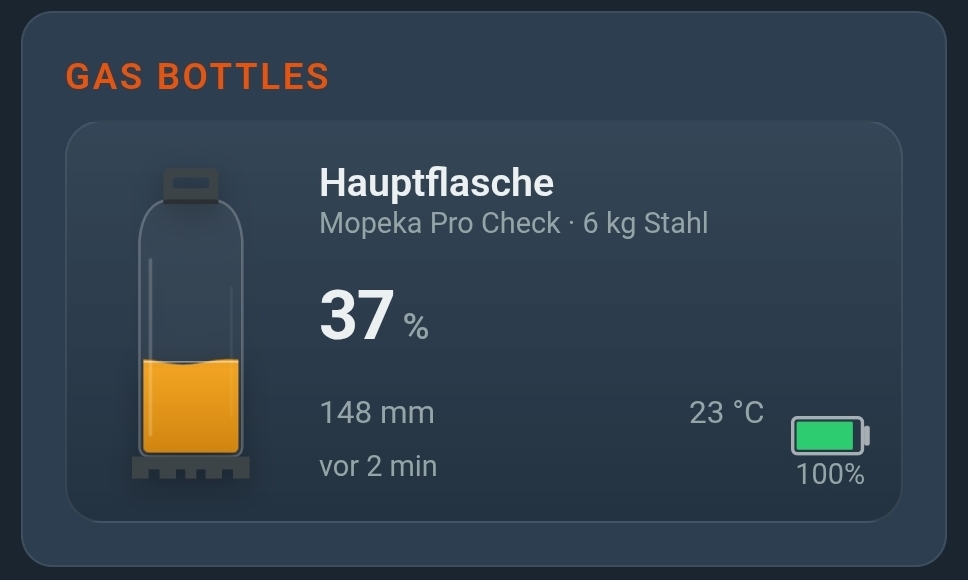
For each bottle, the CampMatic app shows:
- Level in percent
- Fill height
- Temperature at the bottle
You set the bottle type directly in CampMatic: steel 6, 11 and 14 kg, aluminium 6 and 11 kg, CampingGaz 907, US 20, 30 and 40 lb or custom dimensions. With two bottles, you pair two sensors and give them their own names, such as "Main bottle" and "Spare".
In the Telegram bot, the /status command shows the paired gas bottles together with the other values of your box.
An alert before the gas runs out
You do not have to keep checking. In the app you decide for each alert type how it reaches you: by push to your phone, by email, by Telegram or several of them. Paired gas sensors get an alert of their own for the gas level.
Handy in winter storage: there is also an alert for "box offline". That way you notice when the vehicle loses power or network.
Which Mopeka models fit?
- Pro Check: gas, from below, for steel and aluminium bottles as well as fixed tanks.
- Pro+: like the Pro Check, with extended radio range.
- Pro Check Universal: gas and water, from below.
For water tanks, CampMatic reads further Mopeka models. Ultrasound cannot measure composite and plastic bottles; for those there is the Senso4s scale, which CampMatic reads as well. All models are listed on the Integrations page.
Setup in four steps
- Get the box online. The easiest way to set up the WiFi box is the app via Bluetooth; the 4G box uses its own SIM card (Help: setup).
- Create an account and register the box in the app (Help: registration).
- Pair the Mopeka. After purchase, first set the sensor up once with the Mopeka app. Then, in CampMatic under Settings → Devices → Add device, choose the Mopeka gas sensor. If it does not show up, briefly press the SYNC button on the Mopeka (Help: External Devices).
- Link Telegram if you like: Settings → Telegram → "Link Telegram", then tap "Start" in the bot.
Each box pairs up to eight Bluetooth sensors, of which up to four battery monitors. You can mix gas sensors, for example one bottle with a Truma Level Control and one with a Mopeka. How that works with Truma's sensor is in Truma Level Control remote monitoring.
When the sensor will not connect or reads wrongly
Most problems come down to how the sensor is fitted, not to the electronics. Work through these points in order:
- The sensor does not show up: during setup in the Mopeka app, hold down the SYNC button on the sensor until it appears. This can take up to 10 seconds.
- Check the reading quality: the Mopeka app shows how well the ultrasonic measurement is working with up to three stars. Two stars or more is fine, and you will not need to change anything as long as the bottle is not moved. One star or fewer means the sensor is poorly fitted.
- Fit it properly: clean dirt, excess paint and rust off the bottom of the bottle. Place the sensor in the centre of the base; the rubber pad must sit flat with nothing underneath it. Apply a generous amount of the supplied coupling grease to the pad. If you have moved the bottle several times, apply fresh grease.
- Stand the bottle upright: the bottle must be vertical and level, as a tilt degrades the reading. The Mopeka app has a "Sensor Position" function that works like a spirit level to help you line it up.
- The bottle stands directly on the floor: put a spacer under the foot ring. This gives the sensor room and improves the wireless range.
- Aluminium bottle: here the sensor is not held by a magnet but by an adhesive collar. Clean the bottle first with soapy water and then with alcohol to remove any grease.
- Readings jump right after fitting: it can take a few seconds to a few minutes for the measurement to settle.
- Flat battery: the Pro Check runs on a CR2032 coin cell, fitted with the positive side facing up. Do not change it inside the gas locker but somewhere gas cannot collect.
Limits of the sensor: according to the manufacturer, the Mopeka is designed for −30 to 55 °C and only for steel and aluminium bottles, not for composite cylinders. For composite bottles there is the Senso4s scale.
Which box, what it costs
- CampMatic Guard WiFi: €89. For any camper, whatever the heater. Powered via USB, internet via Wi-Fi or hotspot.
- CampMatic Guard 4G: €129. Needs no Wi-Fi but its own SIM card (not included), such as an IoT SIM from about €2 a month.
- App and server: free, no subscription and no monthly fee.
If you have a Truma heater, every CampMatic box for Truma reads the Mopeka too, including the box for Truma iNet X. The Mopeka sensor itself is available from specialist retailers or the manufacturer; it is not included.
Mopeka WiFi Bridge or CampMatic?
Mopeka offers its own WiFi Bridge for remote readings. It picks up the sensors over Bluetooth and uploads the values to the Mopeka cloud via Wi-Fi. How it differs from the CampMatic box:
- Mopeka WiFi Bridge: it needs Wi-Fi where the vehicle is parked, on the 2.4 GHz band; it will not work on 5 GHz. You also need a Mopeka account with the cloud. You only see the values in the Mopeka app. The bridge has to reach both the router and the sensor.
- CampMatic box: it reads the Mopeka itself and shows the level in the CampMatic app, in the Telegram bot and, if you like, in Home Assistant, together with the other values of your box. The WiFi version also needs Wi-Fi or a hotspot. The 4G version works without any Wi-Fi at all.
Which one suits you depends mainly on whether there is Wi-Fi where your vehicle is parked and whether you want to keep an eye on more than just the gas.
Mopeka on a Victron Cerbo GX
If you have a Victron system with a Cerbo GX, the GX device can display the Mopeka too. Victron has supported Mopeka sensors since Venus OS v2.90. The GX needs Bluetooth for this, either built in or as a USB adapter.
- First set the sensor up with the Mopeka app.
- On the GX, go to Settings → I/O → Bluetooth sensors, enable the function and switch the sensor on.
- In the setup, enter the tank capacity, the fluid type and the empty and full values.
If the GX shows the level as "Unknown", the empty and full values have often been swapped. After correcting them, restart the GX.
And Home Assistant?
If you like, the values also reach your Home Assistant via MQTT: Mopeka in Home Assistant. Gas, heating and battery in one app are covered in Heating, gas and battery in one app.