The Truma iNet X is Truma's current control system: a touch panel in the vehicle plus a free app for operating heating and hot water. This overview shows how you can reach your heater remotely as well.
Nearby: over Bluetooth
Near the vehicle, the Truma App connects directly to the iNet X Panel over Bluetooth. You need no extra module for that — turning up the heating from bed works without any additional accessories.
For access on the go, say on the way back from skiing or from the office before the weekend, you need a connection over the internet.
Remotely: iNet X Connect
For that, Truma offers the iNet X Connect remote module. It is installed in addition to the panel and connects the iNet X system to the app over the mobile network. Everything comes from one source, is officially approved and is supported by Truma.
According to Truma, two years of remote access are included with the purchase; after that the service is subject to a charge and can be extended in the app. You will find the current terms at Truma.
Another option: CampMatic for Truma iNet X
There is now also CampMatic for Truma iNet X, a dedicated CampMatic box for vehicles with an iNet X Panel. It connects to the panel via Bluetooth and is powered via a USB cable. You need no cable to the heater, and there is no requirement on the panel. The box comes as a WiFi variant that joins an existing network, for example a mobile hotspot, and as a 4G variant with your own SIM card. There are no fixed monthly costs: the CampMatic app and access via our server are free, and what the internet connection in the vehicle costs is up to your own tariff.
In the CampMatic app you then operate:
- heating (room temperature, mode, energy source or energy mix), hot water levels and the heating level,
- the panel's timers: create, change, delete, switch on and off. They keep running on the control panel, even without a connection,
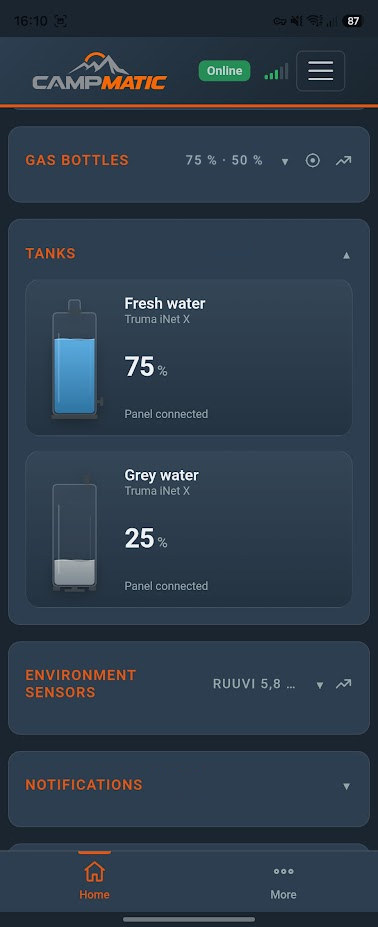
- fresh and grey water tanks (if an electrical block is connected to the panel) and the electrical system with leisure and starter battery, shore power and water pump,
- a Truma air conditioner on the panel (cool, auto or vent, target temperature, cooling level) and gas bottles via a Truma Level Control on the panel.
On top come the external Bluetooth sensors (Mopeka, BM2, Ruuvi, Victron, Senso4s), the Telegram bot, notifications and Home Assistant via MQTT. All features with screenshots are in the article CampMatic for Truma iNet X is here.
Guide: pairing CampMatic with the iNet X Panel
- Set up the box: power the box via the USB cable, bring it online via Wi-Fi or 4G and register it in your account, as with the other CampMatic boxes. Place it within Bluetooth range of the panel.
- Close the Truma app: close the Truma app on your phone. The iNet X Panel needs a free slot in its device list.
- Start pairing: in the CampMatic app, open Settings and tap "Pair panel" on the "Truma iNet X panel" card.
- On the panel: choose "Add device" (Bluetooth), just as with a new smartphone.
- Pair: tap "Pair now" in the app. The window stays open for 2 minutes.
- Done: if the panel shows "Something went wrong", that is normal. The green bar in the app shows the connection.
Truma app and CampMatic side by side: the panel keeps one Bluetooth connection. If you want to use the Truma app in between, tap "Release for Truma app (30 min)" in the CampMatic app. With iNet X, a Truma Level Control is paired with the panel, not with the CampMatic box. The detailed guide with troubleshooting is in the help section.
→ CampMatic for Truma iNet X · WiFi — €149
→ CampMatic for Truma iNet X · 4G — €189
Your options at a glance
- Truma app over Bluetooth: near the vehicle, no extra module.
- Truma iNet X Connect: official remote access over the mobile network, two years included according to Truma, then subject to a charge.
- CampMatic for Truma iNet X: box connected to the panel via Bluetooth, online via Wi-Fi or 4G, no fixed monthly costs, plus external sensors, Telegram and Home Assistant.
What you pay once and what you pay over time is covered in Control Truma iNet X via app — no subscription, no fixed costs.
And if you have a CP Plus?
Then there is CampMatic for Truma CP Plus, also with no fixed monthly costs. You need a CP Plus with firmware C4 or F4, or P5 on the Vario Heat.