The short version: CampMatic for Truma iNet X is available. There is now a dedicated CampMatic box for vehicles with the Truma iNet X Panel. We announced it here in November; all details on the launch are in the article CampMatic for Truma iNet X is here.
Why a separate box?
So far CampMatic had one fixed partner: the Truma CP Plus. The box sits on the LinBUS between the control panel and the heater and works together with the CP Plus. That works with all compatible Combi models and the Vario Heat, provided the CP Plus has the matching firmware.
The Truma iNet X is different. The iNet X Panel replaces the CP Plus and talks to the heater in its own way. That is why the new box does not connect via a cable but via Bluetooth to the panel. It is powered via a USB cable. No cable to the heater, no splitter and no particular firmware are needed.
iNet X Panel or CP Plus — which one do I have?
You can tell at a glance:
- CP Plus: a small display with a push-and-turn knob. For it there is CampMatic for Truma CP Plus; the requirement is firmware C4.xx.xx or F4.xx.xx, on the Vario Heat P5.xx.xx.
- iNet X Panel: a colour touch display you operate with your finger. For it there is CampMatic for Truma iNet X, with no requirement.
The two boxes are not interchangeable. If you are unsure, the FAQ will help.
What the box does on the iNet X Panel
- Heating: room temperature, mode and energy source or energy mix, plus the heating level.
- Hot water in levels.
- The panel's timers: create, change, delete, switch on and off. They keep running on the control panel, even without a connection.
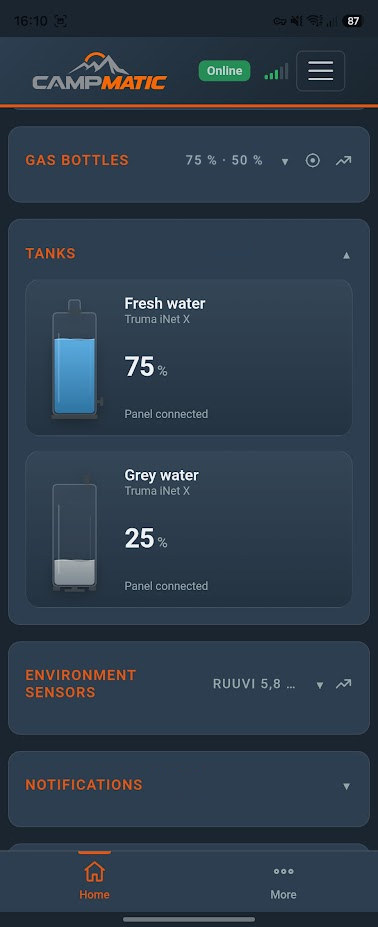
- Fresh and grey water tanks, if an electrical block is connected to the panel.
- Electrical system: leisure and starter battery, shore power and water pump.
- A Truma air conditioner on the panel: cool, auto or vent, target temperature and cooling level.
- Gas bottles via a Truma Level Control paired with the panel.
- Plus the external Bluetooth sensors (Mopeka, BM2, Ruuvi, Victron, Senso4s), the app for iPhone, Android and browser, Telegram, notifications and Home Assistant via MQTT.
As with our other boxes there are no fixed monthly costs. With the 4G variant you use your own SIM card. The box starts at €149.
→ Order CampMatic for Truma iNet X
Installation and pairing
You power the box via the USB cable, bring it online via Wi-Fi or 4G and register it as usual. Then you pair it with the panel in the CampMatic app under Settings → "Truma iNet X panel" → "Pair panel". On the panel you choose "Add device". The step-by-step guide is in the help section.
What other options there are to operate iNet X remotely by app is covered in our overview.
In short
- CampMatic for Truma iNet X is available: connected to the panel via Bluetooth, powered via USB cable, no requirement.
- With a CP Plus (C4 or F4, Vario Heat P5), CampMatic for Truma CP Plus remains available.
- No fixed monthly costs.