A Victron SmartSolar in your motorhome or campervan, a SmartShunt or BMV-712 Smart on the leisure battery and Home Assistant at home: these readings belong together on one dashboard, with history and with the solar yield in the Energy dashboard. Here is the route at a glance. The details, with every file, are in our Home Assistant guide.
The short version
- Supported: Victron SmartSolar MPPT solar charge controllers and the SmartShunt and BMV-712 Smart battery monitors.
- How it works: the CampMatic box in your vehicle reads the Victron devices' Bluetooth "Instant Readout" and sends finished numbers to your Home Assistant via MQTT, over WiFi or 4G.
- Needed once: the key from the VictronConnect app. It goes into the CampMatic app, not into Home Assistant.
- Requirement: firmware 1.37.15 or later on the box. That applies to CampMatic Guard, CampMatic for Truma CP Plus and CampMatic for Truma iNet X.
- Read-only: CampMatic does not control anything on the Victron device.
Why go through the CampMatic box?
VictronConnect only shows the readings within Bluetooth range. The same goes for Home Assistant: it only receives Bluetooth devices within range of its own Bluetooth hardware. If Home Assistant runs at home while the camper sits in winter storage, on a pitch or out on the road, nothing arrives.
The CampMatic box stays in the vehicle, a few metres from the charger. It reads what the charger broadcasts over Bluetooth anyway and delivers the readings via MQTT, over WiFi or 4G, to your Home Assistant wherever it runs, as well as to the CampMatic app and the Telegram bot. No cable, no GX device and no VRM cloud needed.
What you need
- A Victron device with built-in Bluetooth: SmartSolar MPPT, SmartShunt or BMV-712 Smart.
- A CampMatic box with firmware 1.37.15 or later. Older boxes get the update on request from our support and install it themselves via the app.
- A free sensor slot: each Victron device uses one of the up to eight Bluetooth slots per box.
- Home Assistant with the Mosquitto broker add-on, and your MQTT credentials from the CampMatic app.
Step 1: get the key from VictronConnect
- In VictronConnect, tap your device. The factory PIN is
000000. - Tap the gear icon at the top right, then ⋮ → Product info.
- Switch on "Instant readout via Bluetooth". The switch then reads "Enabled".
- Next to "Instant readout details · Encryption data", tap SHOW. The key is 32 characters long, digits and the letters a to f. Copy it rather than typing it: one wrong character and the box cannot read anything.
- Close VictronConnect.
A screenshot of the spot is in our help under "External Devices". The key only allows reading, not control.
Step 2: pair it in the CampMatic app
Under Devices → Add, choose Victron SmartSolar MPPT or Victron SmartShunt / BMV, tap your device in the list and paste the key. If the key is wrong or Instant Readout is off, the app tells you what to do.
Even if you only want the readings in Home Assistant: the key goes into the CampMatic app. Home Assistant receives finished numbers and does not need it.
Step 3: the route into Home Assistant
- Note your credentials: username, password, device number and device ID from the app (chapter 2).
- Set up Mosquitto and the bridge: create the folder
/share/mosquittofirst, then switch oncustomize(chapter 3), then create the bridge file and restart the add-on (chapter 4). To check that readings arrive, listen tocampmatic/<GERAETE_ID>/#(chapter 5). The Victron readings do not register on their own; they come on topics of their own. - Find the slot number: listen to
campmatic/<GERAETE_ID>/+/config. Victron has its own topic,victron/config(chapter 8). - Create the sensors: copy the Victron block from our package and replace
<GERAETE_ID>and<SLOT_SOLAR>, plus<SLOT_SHUNT>for a SmartShunt or BMV. Then check the configuration and do a full restart of Home Assistant (chapter 13). - Dashboard: the ready-made dashboard has a Solar group with PV power, battery, daily yield and the history of the last 48 hours (chapter 14).
What arrives
For the solar charger the readings arrive under campmatic/<GERAETE_ID>/victron/solar_<SLOT_SOLAR>/…, for the battery monitor under …/victron/shunt_<SLOT_SHUNT>/…. Readings without valid content are not sent at all.
| Device | Readings |
|---|---|
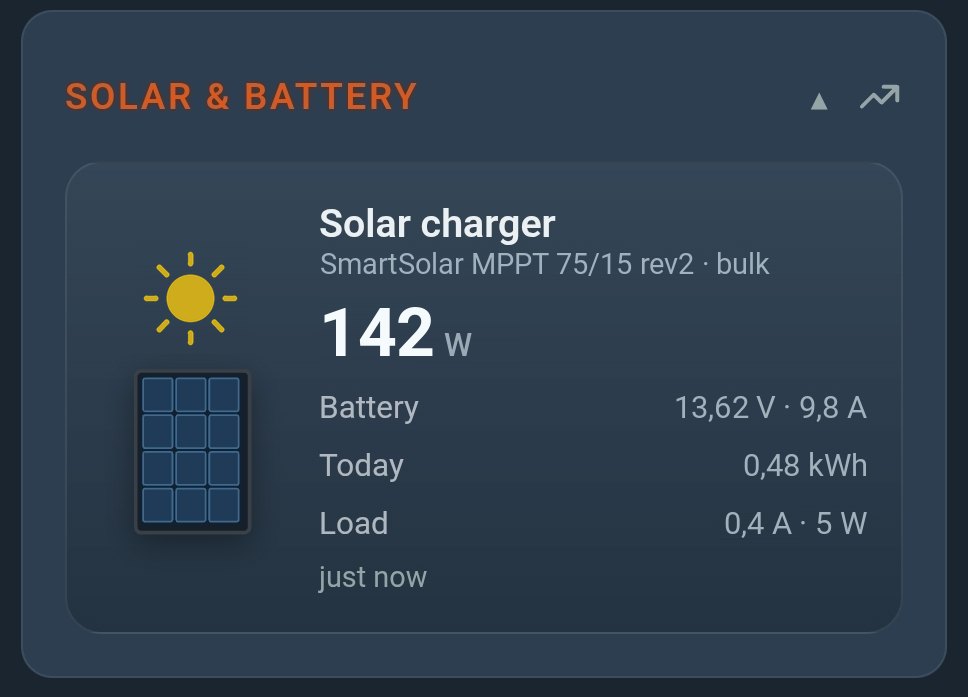
| SmartSolar MPPT | PV power, battery voltage, charge current, yield today in kWh, charge state, error code, load current (only on chargers with a load output), signal strength, model ID |
| SmartShunt, BMV-712 Smart | state of charge in %, voltage, current (negative means discharging), consumed Ah, time left in minutes, alarms; depending on the auxiliary input, starter battery, midpoint voltage or temperature |
| Reception | in the victron/status topic per slot: ok, key (key does not match), off (Instant Readout switched off) or none (nothing received yet) |
Our package turns them into sensors such as Solar Charger PV Power, Solar Charger Yield Today or SmartShunt State of Charge, plus the charge state as plain text, the problem sensor Solar Charger Fault and Solar Charger Reception. The error code is the same number VictronConnect shows as "Err N".
Solar yield in the Energy dashboard
Solar Charger Yield Today is set up as an energy sensor in kWh. In the Energy dashboard settings you add it as solar production. One quirk: the charger resets the daily yield at the next sunrise, not at midnight. Home Assistant recognises the reset by itself and adds up the days correctly.
How current are the readings?
The box sends new readings roughly every five to six minutes, even though the charger itself broadcasts more often. That is not a second-by-second meter. For solar yield and state of charge, which change over hours, it is plenty. Readings are not stored on the broker: after a restart of Home Assistant the sensors show "unavailable" until the next reading.
What CampMatic cannot do
CampMatic only reads. Switching the load output, changing charge parameters or updating the charger's firmware still needs VictronConnect. PV voltage and PV current are missing because Victron does not include them in Instant Readout.
One more note on the key: the victron/config topic contains your key alongside slot and MAC address, and the bridge mirrors it into your own broker. If you share a capture, for example in a forum, blank out the key first.
What it costs
CampMatic has no subscription. The app and the server are free; you buy the box once. Without a Truma heater, CampMatic Guard is all you need: Guard WiFi for €89 or Guard 4G for €129. The 4G version needs a SIM card of your own, which is not included; an IoT SIM costs from around €2 a month. If you also want to control your Truma heater, CampMatic for Truma starts at €149. Victron devices are not included.
Frequently asked questions
All Victron sensors show "unavailable". What now?
Check what Solar Charger Reception says. With key the key does not match: copy it again in VictronConnect and re-enter it in the CampMatic app. With off, Instant Readout is switched off. If both are fine, check whether VictronConnect is still connected to the charger, close the app and wait a few minutes (troubleshooting).
And the gas bottle?
The Senso4s gas scale reaches Home Assistant the same way: Senso4s in Home Assistant.
→ Order CampMatic Guard WiFi — €89
→ Order CampMatic Guard 4G — €129
Further reading: