The short version: CampMatic now reads Victron SmartSolar MPPT solar charge controllers and the SmartShunt and BMV-712 Smart battery monitors. PV power, daily yield, the state of charge of your leisure battery and controller faults show up in the CampMatic app, in the Telegram bot and, if you like, in Home Assistant — from anywhere, over WiFi or mobile data.
You need neither a cable nor any extra Victron hardware. The CampMatic box in the vehicle simply picks up what your charger broadcasts over Bluetooth anyway.
The problem: VictronConnect stops at the vehicle door
Victron's VictronConnect app shows every reading from your charger. Without extra hardware, though, it only works over Bluetooth — so only while you are within a few metres. At home, at work or with the camper in winter storage, you see nothing.
Remote access through Victron's own VRM portal needs additional Victron hardware with an internet connection, such as a GX device like the Cerbo GX. If you already have a CampMatic in the vehicle, you can do without.
How CampMatic reads the charger
Victron devices with Bluetooth have a feature called "Instant Readout". When it is switched on, the charger regularly broadcasts its key readings, encrypted. Anyone with the matching key can read them.
That is exactly what the CampMatic box does: it listens, decrypts the readings with your key and passes them on. In practice that means:
- no cable — no VE.Direct cable, nothing to connect
- no GX device and no VRM cloud
- no connection to the charger — the box only reads what the charger broadcasts anyway
To be clear: CampMatic only reads, it does not control anything. Switching the load output, changing charge settings or updating the charger's firmware all stay with VictronConnect.
Which Victron devices are supported
- Victron SmartSolar MPPT — the solar charge controllers with built-in Bluetooth. The app recognises the model and shows it by name, for example "SmartSolar MPPT 75/15 rev2".
- Victron SmartShunt and BMV-712 Smart — the battery monitors that use a shunt to measure how much current flows into and out of the battery.
CampMatic does not show other Victron devices at the moment.
What you see in the app
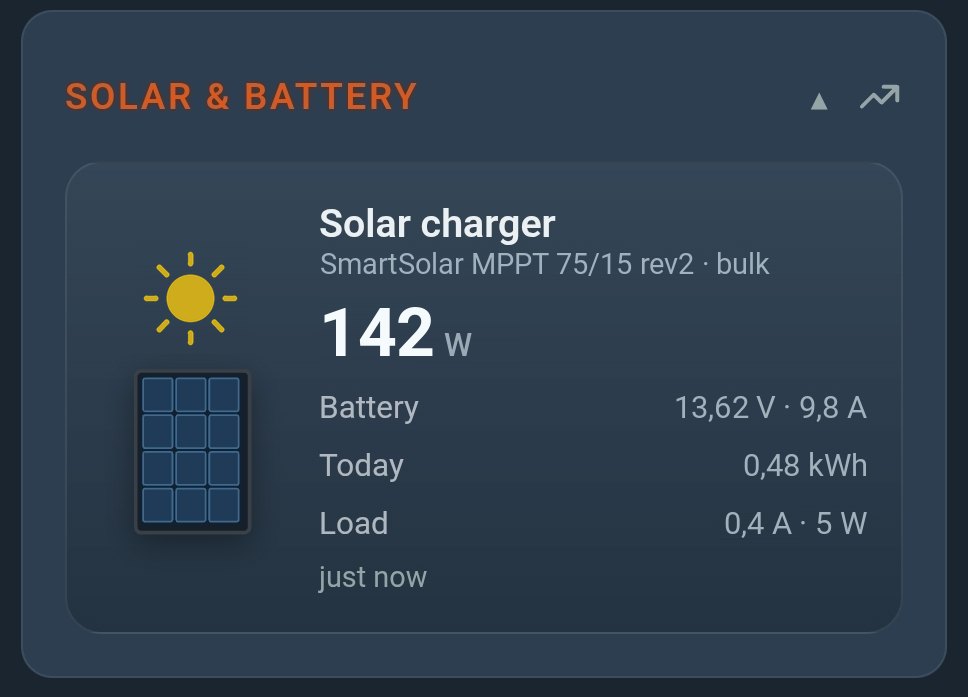
Each solar charge controller gets a card of its own in the CampMatic app:
- PV power in watts as the big main value — the sun in the picture lights up as soon as the panels deliver
- Battery voltage and charge current
- Charge state in plain words: off, bulk, absorption, float, equalize
- Yield today in kWh
- Load output: current and power
- Controller faults explained in plain language
For the SmartShunt and BMV-712 Smart, the card shows the state of charge of your leisure battery in percent, plus voltage, current, consumed amp-hours and the time remaining.
History and yield statistics
The history window shows PV power and battery voltage over 24 hours, 48 hours, 7 days and 30 days. On top of that you get the daily yield as a bar chart over 30 days, with the total. That tells you at a glance what your system really delivers — and whether a day stands out.
CampMatic stores the daily yield itself, so it does not depend on the history in VictronConnect. For the battery monitor, CampMatic records state of charge and voltage.
How fresh are the readings?
A new reading arrives about every 5 to 6 minutes. That is deliberate: the box saves mobile data and leaves the heater bus alone. For solar yield and state of charge, which change over hours, that is plenty. CampMatic is not a second-by-second meter.
An alert when the charger reports a fault
If the charger reports a fault, you get a message — with an explanation rather than just an error code. For example:
- battery temperature too high or too low
- battery voltage too high
- charger overheated
- terminals overheated
- PV voltage too high — check how the panels are wired
- short circuit on the charge output
- connection to the BMS lost
Push and Telegram are on by default, and you can add email. You set all three per device in the app. If the fault code changes, a new message follows.
In the Telegram bot, /status shows a "Solar & battery" block with charge state, power, battery voltage, yield today and any fault. So you can check without opening the app.
Setup in two steps
1. In VictronConnect: switch on Instant Readout and copy the key
- Connect to your charger in the VictronConnect app.
- Tap gear icon → ⋮ → Product info.
- Switch on "Instant readout via Bluetooth".
- Next to Encryption data, tap SHOW and copy the 32-character key.
- Close VictronConnect.
A screenshot in our help section under "External Devices" shows exactly where the switches are.
2. In CampMatic: add the device and paste the key
In the CampMatic app, go to Devices, tap Add and choose the type Victron SmartSolar MPPT or Victron SmartShunt / BMV. Then pick your charger from the list and insert the key with the paste button. In our test, the charger was paired 22 seconds later.
The app walks you through it step by step, using the same labels as VictronConnect. It catches the usual pitfalls:
- Wrong key: the app spots it and shows a hint instead of wrong readings.
- Instant Readout switched off: the app notices and tells you where to switch it on.
- Half-copied key: a counter shows "32/32". Spaces and line breaks are removed automatically.
Is it safe?
The key from VictronConnect only allows reading. Nothing on the charger can be changed with it. CampMatic does not write it to logs and never hands it back out through the app's interface. And because the box never connects to the charger, your Victron system stays exactly as you set it up.
Home Assistant and MQTT
The Victron readings arrive via MQTT like every other CampMatic value. Our ready-made Home Assistant package covers it:
- Yield today as an energy sensor — so it fits straight into the Home Assistant Energy dashboard
- the charge state as readable text
- a Solar group of its own in the dashboard
The step-by-step guide is in the chapter Solar charger (Victron) of our Home Assistant guide.
What you need
- A CampMatic box — Victron works on all of them: CampMatic for Truma (WiFi and 4G, for CP Plus and Truma iNet X Panel) and CampMatic Guard.
- Firmware 1.37.15 or newer on the box. Existing devices get the update from support on request and install it themselves via the app.
- CampMatic app version 1.34 or later.
- Bluetooth range: charger and box must be within radio range. Inside a vehicle that is a few metres, so no problem.
- A free sensor slot: each Victron device takes one of the eight Bluetooth slots per box, shared with gas bottle sensors, BM2, Ruuvi and the other sensors.
Which CampMatic is right for you?
No Truma heater needed: with CampMatic Guard, every camper with a Victron charger gets remote access and fault alerts — whatever heater is on board. If you also want to control a Truma heater, choose the Truma version.
- CampMatic Guard WiFi — €89, connects via phone hotspot or campsite WiFi
- CampMatic Guard 4G — €129, with its own SIM card, ideal for winter storage without WiFi
- CampMatic for Truma · WiFi — €149 (iNet X) or €149 (CP Plus), including Truma heater control
- CampMatic for Truma · 4G — €189 (iNet X) or €209 (CP Plus), heater control over mobile data
Victron chargers, SmartShunt and BMV-712 Smart are not included with CampMatic.
Conclusion
Your solar system delivers, but you only see it when you are standing next to it — that changes now. CampMatic takes the readings of your Victron SmartSolar and your SmartShunt or BMV-712 Smart beyond Bluetooth range: yield, state of charge and fault alerts in the app, on Telegram and in Home Assistant, all on one dashboard together with heating, gas and indoor climate.
Setup means: switch on Instant Readout, copy the key, paste it into CampMatic. No cable, no GX device, no extra cloud.
→ Order CampMatic Guard WiFi — €89.00
→ CampMatic Guard 4G with its own SIM card — €129.00
→ All supported sensors on the Integrations page
Questions about the setup? Check the help section or drop us a line via the contact form.