
Until now, CampMatic could control your Truma heater, monitor your gas bottle level (Truma Level Control, Mopeka) and your onboard battery (BM2). From now on there is a fourth building block: Ruuvi environment sensors. That gives you temperature, humidity and air pressure in your motorhome at any time — live in the app, via Telegram and in Home Assistant, wherever you are.
In this post we show what a Ruuvi sensor can do, what CampMatic makes of it, and which everyday camper situations become a lot more relaxed with it.
What is a Ruuvi tag?
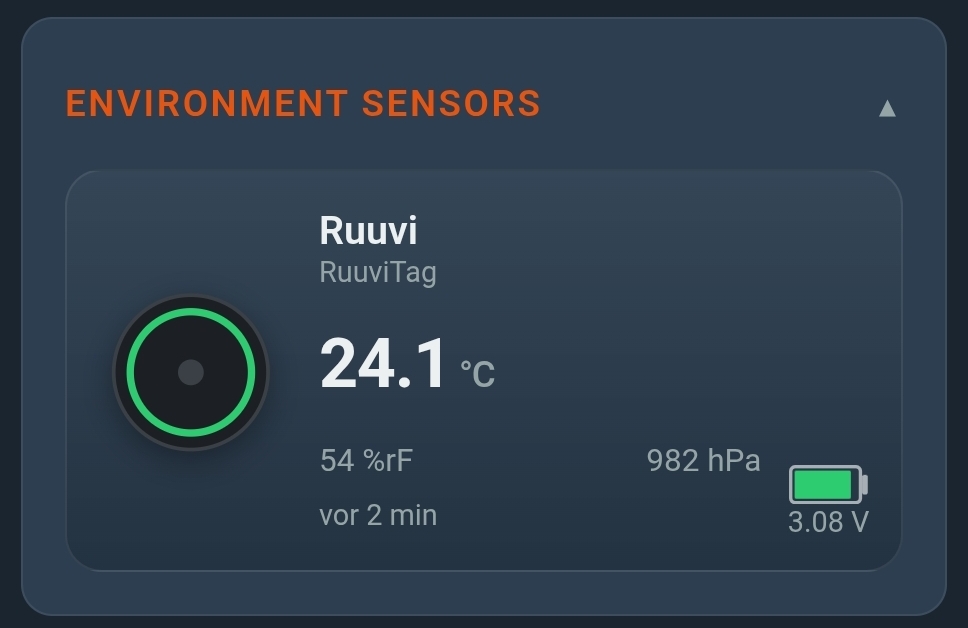
A RuuviTag is a small, round radio sensor that continuously broadcasts readings over Bluetooth Low Energy. A single sensor measures, at the same time:
- Temperature — accurate to about ±0.2 °C
- Humidity — relative humidity in %
- Air pressure — in hPa, effectively a little barometer
The sensor is low-maintenance: a coin cell lasts several years, depending on the broadcast interval. It is splash-proof, compact and can be placed anywhere in the camper — in the living area, in the fridge, in the gas bottle locker or outside under the awning.
What CampMatic makes of it
The catch with Bluetooth: its range is around 10 metres. With the manufacturer app you only see the readings when you are standing right next to the camper. This is exactly where CampMatic comes in.
The CampMatic device in the camper reads the Ruuvi sensor over Bluetooth and sends the values to the cloud over WiFi or 4G. From there you get them — from anywhere:
That is otherwise the job of the Ruuvi Gateway at around €200 — with CampMatic this bridge is already built in. Why that is the far cheaper option is shown in our comparison: Ruuvi without the pricey gateway.
- CampMatic app — every Ruuvi sensor gets its own tile with live values and a history chart.
- Telegram bot — a push alert when a threshold is crossed (e.g. frost risk), plus on-demand queries by command.
- Home Assistant & MQTT — the sensor appears automatically via auto-discovery as an entity for your own dashboards and automations.
Five situations where this makes the difference
1. Frost protection in winter storage
The camper is parked 150 km away in winter storage. If the inside temperature drops towards 0 °C, you risk frozen pipes and a burst boiler. With a Ruuvi in the living area you get a Telegram warning before it gets critical — and can react (fire up the heater via CampMatic, drive over, drain the water).
2. Is the fridge still running?
A Ruuvi in the fridge shows you the real inside temperature. If it rises above the setpoint — gas empty, absorber failed, door not properly closed — you notice immediately, instead of finding spoiled food in the evening.
3. Prevent damp & mould
Excessive humidity over a longer period is the main cause of mould and damp stains in the body. With the humidity history you spot early when it stays too damp, and can act: ventilate, add heat, switch on a dehumidifier.
4. Sensitive cargo & pets
Whether it is medication, food, electronics or the dog waiting alone in the camper for a bit: a Ruuvi warns you when it gets too warm or too cold inside — even when you are not nearby.
5. The barometer for a weather check
Air pressure is a good early indicator of the weather. A falling trend over a few hours often signals worsening weather — handy for pulling in the awning in time when you are off-grid.
Several sensors, no problem
As with gas and battery, CampMatic also supports several Ruuvi sensors at once (1..n). A typical setup looks like this:
- Living area — the central comfort and frost watch.
- Fridge — keeping an eye on the cold chain.
- Outside — the real outdoor temperature, independent of indoor warmth.
Each sensor gets its own name and its own card with live value and history. So you can see at a glance where it is warm, cool or damp.
Set up in minutes
Setup works just like the other Bluetooth sensors:
- Activate the sensor — start the RuuviTag once with the manufacturer's Ruuvi app on your smartphone.
- Add it in CampMatic — in the settings under Devices → Add device, select the Ruuvi environment sensor.
- Done — CampMatic finds the sensor automatically when in range and shows it as its own tile on the dashboard.
A step-by-step guide with images is in the CampMatic help under "External devices".
Together with gas, battery & heating
The best part: Ruuvi is not an island, it slots into the existing CampMatic hub. In the same app you see heating, gas bottle, onboard battery and indoor climate side by side — and spot connections that stay invisible in separate apps. Is the inside temperature falling even though the heater is running? One glance is enough to assess gas level, battery and temperature together. More on this: heating, gas & battery in one app.
Which device do I need?
Ruuvi works with both CampMatic lines:
- CampMatic Truma (from €149) — if you also want to control the Truma heater. Monitoring is already included.
- CampMatic Guard (from €89) — if you "only" want to monitor, without any Truma heater.
Note: The Ruuvi sensor is — like the gas and BM2 sensors — not included. You can buy RuuviTags easily in retail (approx. €30–50 each); bought once, they run for years.
Conclusion
With Ruuvi, CampMatic gains another sense: a feel for the climate inside the camper. Temperature, humidity and air pressure — live, from anywhere, bundled with heating, gas and battery in one app. Whether it is frost protection in winter storage, fridge monitoring on the road or mould prevention over winter: you look once and you know, or Telegram gets in touch when there is really something to do.
→ CampMatic Truma WiFi (GC_HW01) — heating + monitoring, €149
→ CampMatic Guard WiFi (CM_LC_01) — monitoring only, €89
Questions about picking sensors? Check the help or write to us via the contact form — we are happy to help you put it together.